Android RecyclerView List Example
The RecyclerView class extends the ViewGroup class and implements ScrollingView interface. It is introduced in Marshmallow. It is an advanced version of the ListView with improved performance and other benefits. RecyclerView is mostly used to design the user interface with the fine-grain control over the lists and grids of android application.
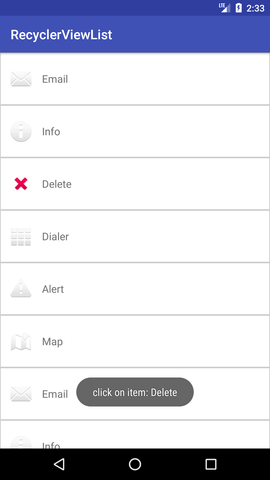
In this tutorial, we will create a list of items with ImageView (for the icon) and TextView (for description) using RecyclerView and performs click listener on the item of its list.
Android RecyclerView with List Example
Create an Android project, and add the RecyclerView support library com.android.support:recyclerview-v7:23.1.0 or above this version in build.gradle file.
In the activity_main.xml file in layout directory, add the RecyclerView widget.
activity_main.xml
- <?xml version="1.0" encoding="utf-8"?>
- <android.support.v7.widget.RecyclerView
- xmlns:android="http://schemas.android.com/apk/res/android"
- xmlns:tools="http://schemas.android.com/tools"
- android:layout_width="match_parent"
- android:layout_height="match_parent"
- android:scrollbars="vertical"
- android:id="@+id/recyclerView"
- tools:context="example.javatpoint.com.recyclerviewlist.MainActivity">
-
- </android.support.v7.widget.RecyclerView>
Create a dimens.xml file in values directory, and add the following code.
dimens.xml
- <?xml version="1.0" encoding="utf-8"?>
- <resources>
- <dimen name="activity_horizontal_margin">16dp</dimen>
- <dimen name="activity_vertical_margin">16dp</dimen>
- <dimen name="ic_clear_margin">56dp</dimen>
- </resources>
Create a custom layout list_item.xml file with following code.
list_item.xml
- <?xml version="1.0" encoding="utf-8"?>
- <RelativeLayout xmlns:android="http://schemas.android.com/apk/res/android"
- android:id="@+id/relativeLayout"
- android:layout_width="match_parent"
- android:layout_height="?android:attr/listPreferredItemHeightLarge"
- android:background="@drawable/border">
-
- <ImageView
- android:id="@+id/imageView"
- android:layout_width="wrap_content"
- android:layout_height="wrap_content"
- android:layout_centerVertical="true"
- android:layout_alignParentStart="true"
- android:layout_alignParentLeft="true"
- android:layout_marginStart="@dimen/activity_horizontal_margin"
- android:layout_marginEnd="@dimen/activity_horizontal_margin"
- android:contentDescription="Icon" />
-
- <TextView
- android:id="@+id/textView"
- android:layout_width="wrap_content"
- android:layout_height="match_parent"
- android:layout_toEndOf="@id/imageView"
- android:layout_toRightOf="@id/imageView"
- android:gravity="center_vertical"
- android:textSize="16sp"/>
-
- </RelativeLayout>
Create a border.xml file in the drawable directory which is used to decorate the border of RecyclerView items.
border.xml
- <?xml version="1.0" encoding="utf-8"?>
- <shape xmlns:android="http://schemas.android.com/apk/res/android"
- android:shape="rectangle">
- <solid android:color="#FFFFFF" />
- <stroke
- android:width="1dp"
- android:color="#CCCCCC" />
- </shape>
Create a MyListData.java class with the following code. This class is used as (POJO) class which sets the properties of the items.
MyListData.java
- package example.javatpoint.com.recyclerviewlist;
- public class MyListData{
- private String description;
- private int imgId;
- public MyListData(String description, int imgId) {
- this.description = description;
- this.imgId = imgId;
- }
- public String getDescription() {
- return description;
- }
- public void setDescription(String description) {
- this.description = description;
- }
- public int getImgId() {
- return imgId;
- }
- public void setImgId(int imgId) {
- this.imgId = imgId;
- }
- }
Create a MyListAdapter.java class and add the following code. This class extends RecyclerView.Adapter class and override its unimplemented methods. The onCreateViewHolder() methods inflates the list_item.xml. In the onBindViewHolder() method each data items are set to each row.
MyListAdapter.java
- package example.javatpoint.com.recyclerviewlist;
-
- import android.support.v7.widget.RecyclerView;
- import android.view.LayoutInflater;
- import android.view.View;
- import android.view.ViewGroup;
- import android.widget.ImageView;
- import android.widget.RelativeLayout;
- import android.widget.TextView;
- import android.widget.Toast;
-
-
- public class MyListAdapter extends RecyclerView.Adapter<MyListAdapter.ViewHolder>{
- private MyListData[] listdata;
-
-
- public MyListAdapter(MyListData[] listdata) {
- this.listdata = listdata;
- }
- @Override
- public ViewHolder onCreateViewHolder(ViewGroup parent, int viewType) {
- LayoutInflater layoutInflater = LayoutInflater.from(parent.getContext());
- View listItem= layoutInflater.inflate(R.layout.list_item, parent, false);
- ViewHolder viewHolder = new ViewHolder(listItem);
- return viewHolder;
- }
-
- @Override
- public void onBindViewHolder(ViewHolder holder, int position) {
- final MyListData myListData = listdata[position];
- holder.textView.setText(listdata[position].getDescription());
- holder.imageView.setImageResource(listdata[position].getImgId());
- holder.relativeLayout.setOnClickListener(new View.OnClickListener() {
- @Override
- public void onClick(View view) {
- Toast.makeText(view.getContext(),"click on item: "+myListData.getDescription(),Toast.LENGTH_LONG).show();
- }
- });
- }
-
-
- @Override
- public int getItemCount() {
- return listdata.length;
- }
-
- public static class ViewHolder extends RecyclerView.ViewHolder {
- public ImageView imageView;
- public TextView textView;
- public RelativeLayout relativeLayout;
- public ViewHolder(View itemView) {
- super(itemView);
- this.imageView = (ImageView) itemView.findViewById(R.id.imageView);
- this.textView = (TextView) itemView.findViewById(R.id.textView);
- relativeLayout = (RelativeLayout)itemView.findViewById(R.id.relativeLayout);
- }
- }
- }
Finally, in the MainActivity.java class, add the following code. This class creates the array of items for MyListData class and set the adapter class to RecyclerView.
MainActivity.java
- package example.javatpoint.com.recyclerviewlist;
-
- import android.support.v7.app.AppCompatActivity;
- import android.os.Bundle;
- import android.support.v7.widget.LinearLayoutManager;
- import android.support.v7.widget.RecyclerView;
-
- public class MainActivity extends AppCompatActivity {
-
- @Override
- protected void onCreate(Bundle savedInstanceState) {
- super.onCreate(savedInstanceState);
- setContentView(R.layout.activity_main);
- MyListData[] myListData = new MyListData[] {
- new MyListData("Email", android.R.drawable.ic_dialog_email),
- new MyListData("Info", android.R.drawable.ic_dialog_info),
- new MyListData("Delete", android.R.drawable.ic_delete),
- new MyListData("Dialer", android.R.drawable.ic_dialog_dialer),
- new MyListData("Alert", android.R.drawable.ic_dialog_alert),
- new MyListData("Map", android.R.drawable.ic_dialog_map),
- new MyListData("Email", android.R.drawable.ic_dialog_email),
- new MyListData("Info", android.R.drawable.ic_dialog_info),
- new MyListData("Delete", android.R.drawable.ic_delete),
- new MyListData("Dialer", android.R.drawable.ic_dialog_dialer),
- new MyListData("Alert", android.R.drawable.ic_dialog_alert),
- new MyListData("Map", android.R.drawable.ic_dialog_map),
- };
-
- RecyclerView recyclerView = (RecyclerView) findViewById(R.id.recyclerView);
- MyListAdapter adapter = new MyListAdapter(myListData);
- recyclerView.setHasFixedSize(true);
- recyclerView.setLayoutManager(new LinearLayoutManager(this));
- recyclerView.setAdapter(adapter);
- }
- }
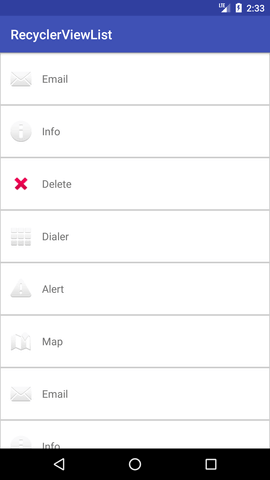
Output:


0 Comments
Post a Comment